Cold Chain Monitoring
Location: Dashboards → Cold Chain Monitoring
Monitor temperature and humidity across your cold chain — fridges, freezers, cold rooms, and in-transit shipments. Get real-time alerts, compliance reports, and predictive analysis.
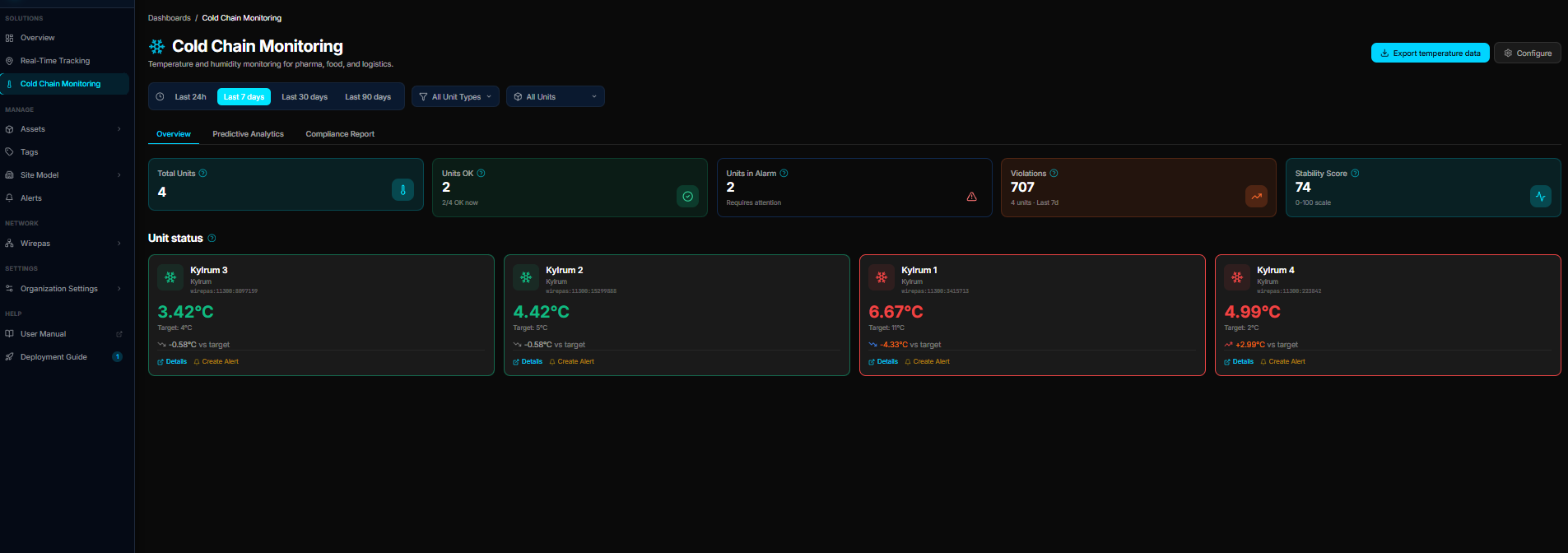 The Cold Chain dashboard showing temperature readings, KPIs, and unit status.
Overview Tab
KPI Cards
| KPI | Description |
|---|---|
| Total Units | Number of monitored assets with temperature sensors |
| Units OK | Assets currently within their configured temperature range (with % of total) |
| Units in Alarm | Assets currently outside their temperature limits |
| Violations | Total threshold exceedances in the selected period |
| Stability Score | Percentage of readings within thresholds (higher = more stable) |
Unit Status Grid
Each asset appears as a card showing:
- Current temperature — large reading with unit (°C)
- Status — green (OK), red (alarm), gray (no data)
- Min/Max thresholds — configured limits for this asset
- Last updated — timestamp of most recent reading
- Trend indicator — temperature direction (rising/falling/stable)
- Zone — which geofence/location the asset is in
Click any card to see its detailed temperature history.
Predictive Analytics Tab
How steady a unit has been, and whether it is drifting.
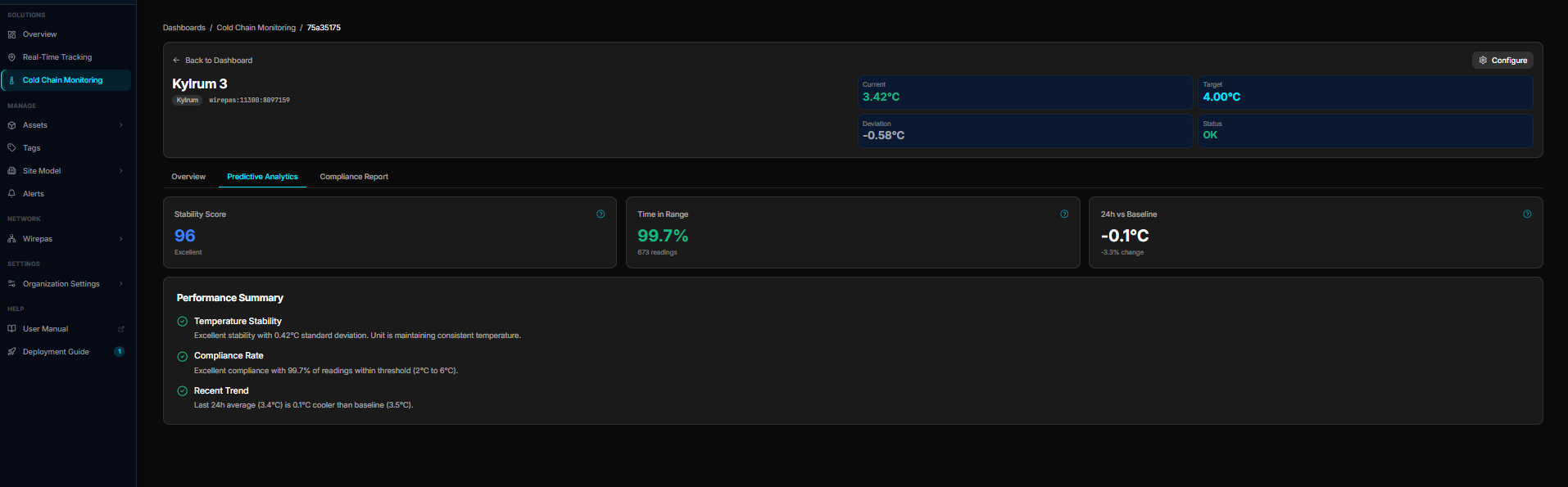 Stability score, time in range, and the deviation from the unit's own baseline.
| Figure | What it means |
|---|---|
| Stability Score | How steady the temperature stays, 0–100. Above 85 is good; below 75 deserves a look. |
| Time in Range | Share of readings inside the threshold band, with the number of readings behind it |
| 24h vs Baseline | How the last day compares with the unit's 30-day normal |
The Performance Summary underneath turns those three into plain sentences — stability, compliance rate, and the recent trend.
Compliance Report Tab
A day-by-day record for audits.
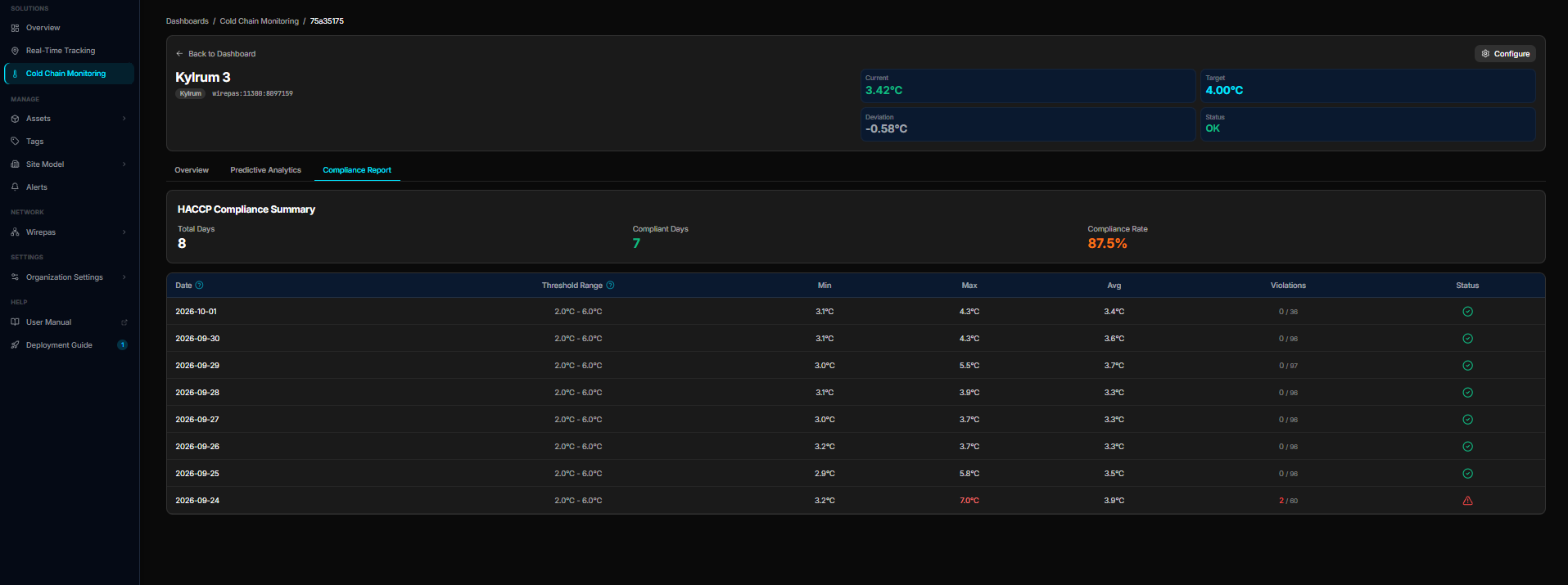 HACCP summary with compliant days, plus one row per day with min, max, average and violations.
- HACCP Compliance Summary — total days, compliant days, and the resulting compliance rate
- Daily table — threshold range, min, max and average for each day, the number of violating readings out of the day's total, and a pass/warn status
- Violations — any day with readings outside the band is flagged in red, so a single bad night is easy to find
Exporting the readings
Use Export temperature data on the Cold Chain dashboard to download the underlying readings as CSV for the period you select.
Configuration
Click the settings button to open Dashboard Configuration:
Global Thresholds (Overrides) — set default min/max temperature limits for all assets. Leave empty to use asset-specific settings from the Alerts configuration.
Sensor Technologies — choose which tag types to include:
- Wirepas — mesh network sensors (default for cold chain)
- PowerTag, BLE, GPS, Cellular — other sensor types
Asset Types — checkbox filter to show specific asset types only. Leave all unchecked for all types.
Setting Up Cold Chain Monitoring
- Deploy EverTag T sensors — place temperature sensors inside fridges, freezers, and cold rooms
- Associate tags with assets — link each sensor tag to an asset on the Assets page
- Configure thresholds — set min/max temperature per asset or globally in Configuration
- Set alert rules — on the Alerts page, create rules for temperature breaches (email, SMS, webhook)
- Monitor the dashboard — review KPIs and respond to alarms
Data Sources
| Metric | Source |
|---|---|
| Temperature readings | Wirepas sensor data (sensor_data.temperature) |
| Thresholds | Asset-specific settings or global dashboard overrides |
| Positions/zones | Latest RTLS position reports, matched to geofences |
| Violations | Readings outside configured min/max thresholds |